One service, read in full.
ODataTailor is a workbench with six areas: open, understand, query, change, check and capture. Here is what each one holds – with a source for every statement.
Any service, three ways in.
By service URL, from the catalogue or as a file – V2 and V4, EDMX and CSDL JSON1. The workbench asks with your browser’s sign-in.
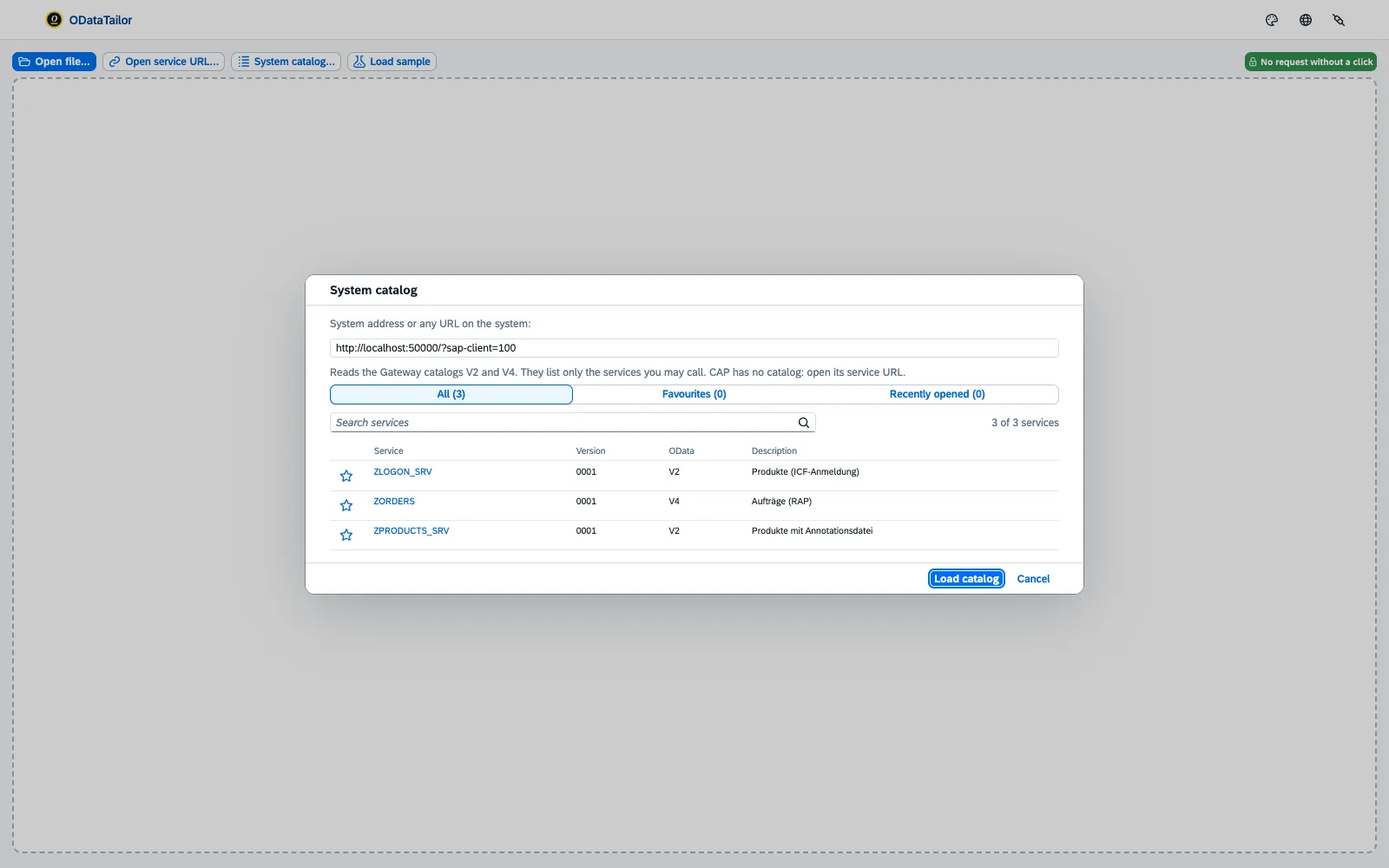
- “Open service URL”.Paste the service root or the
$metadataURL, “Load” – the browser asks once for this system2. If the session has expired, “Sign in in a tab” opens the sign-in; on a 403 it says what is missing. - System catalogue.Every service of an SAP Gateway for V2 and V4, with search, favourites and “recently opened” per system. Annotation files come along.
- File and sample.
$metadataand annotation files via dialog or drag and drop; two samples (V4 with CAP, V2 with Gateway) to try without a system. - Systems.The “Systems” dialog lists every system with host access, revokes it and marks a system as “Production”3.
- Workspace.Opened services stay open across restarts – in this browser only4.
Docs: Opening a service · Permissions and privacy →
The diagram instead of the XML.
The graphical metadata explorer5 from FrontTailor: every type, its navigations and annotations, with focus and a path finder.
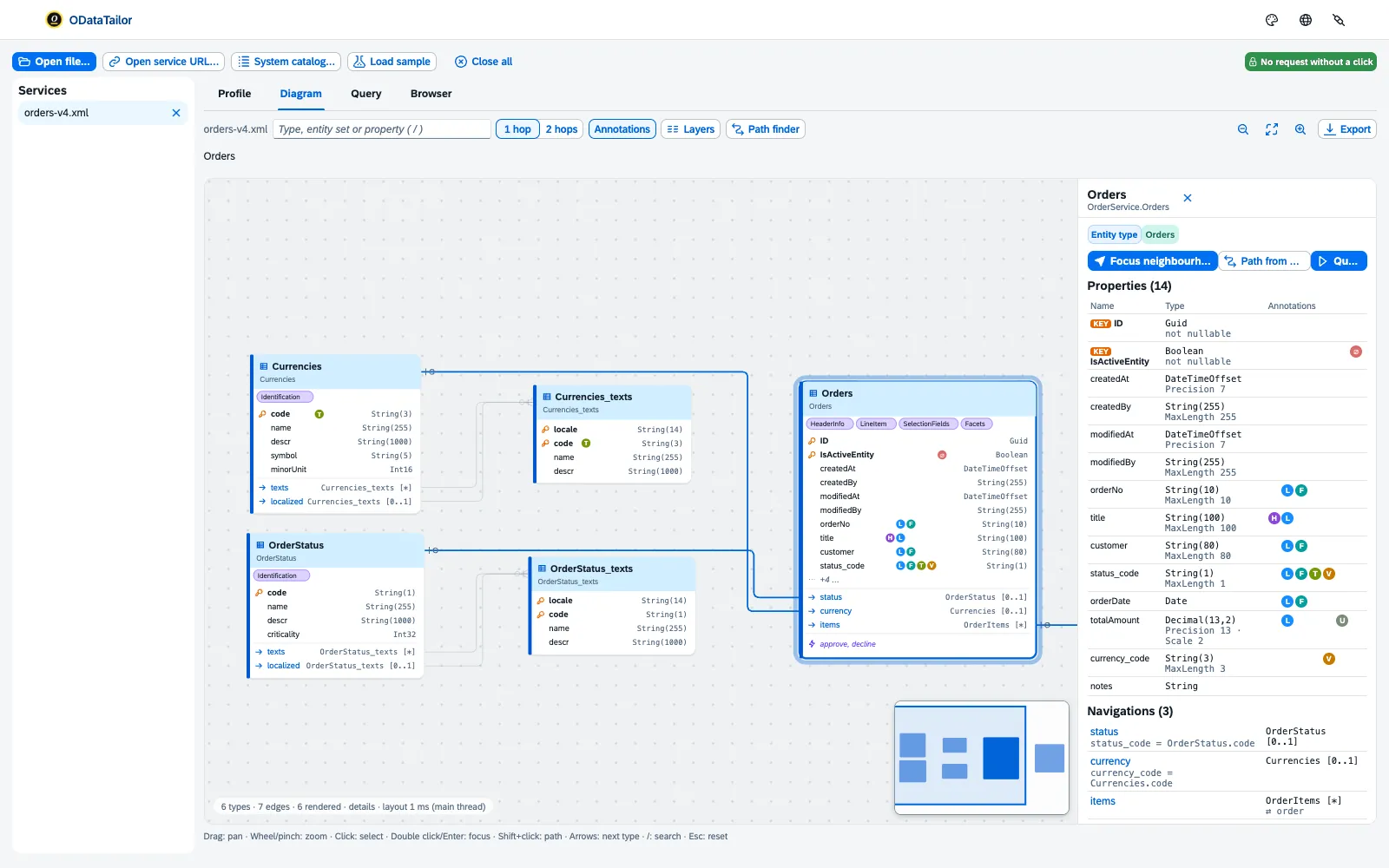
- Annotation markers.Every annotation as a marker in a fixed column, the same letter always in line. A click opens the explanation, the position in the collection, the values and the link to the vocabulary.
- Path finder.Pick two types, the workbench shows the way and the matching
$expand. - Profile.Version, sets, types, operations and annotations6 of a service on one page, “Copy as Markdown” for ticket and wiki.
- Browser.Full-text search across all types, properties and annotations.
- Large stays fluid.Measured with 1,000 types; export of the diagram as an image.
- Query from the diagram.“Query” on an entity leads straight to the request of a list report.
Chapters and transcript
Chapters
- Introduction
- Profile
- Diagram
- Path finder
- Export
- FrontTailor
What is said in the video
A service you do not know – and you want to see what is inside: which types, which navigations, which annotations. For that, ODataTailor has the profile, the diagram and the browser. “Load sample” opens a V4 service with annotations – without any network.
You open an EDMX file or a service by its URL the same way. The profile tells you where the service comes from, how big it is and what each entity set allows – down to drafts. “Copy as Markdown” puts it on the clipboard for your ticket.
The diagram shows every type with its navigations. The letters next to the fields are annotations – one click explains what Fiori makes of them, with a link to the vocabulary. How do you get from the order items to the status text?
“Path finder”: pick the start, Shift-click the target – and ODataTailor builds the $expand for it. For docs and the wiki, export the current view as SVG or PNG – or copy it as a Mermaid erDiagram. And in the browser, search finds every element of the service – sets, types, properties, operations and annotations.
Explaining annotations right on the running Fiori app – which control is bound to what – is what FrontTailor does, inside the app. More at fronttailor.com. ODataTailor is free, with no account and no server.
More at odatatailor.com.
Docs: Diagram and profile →
Ask as Fiori asks. Read as Fiori shows.
A query builder7 that knows the metadata, and a result that looks as it does in the app.
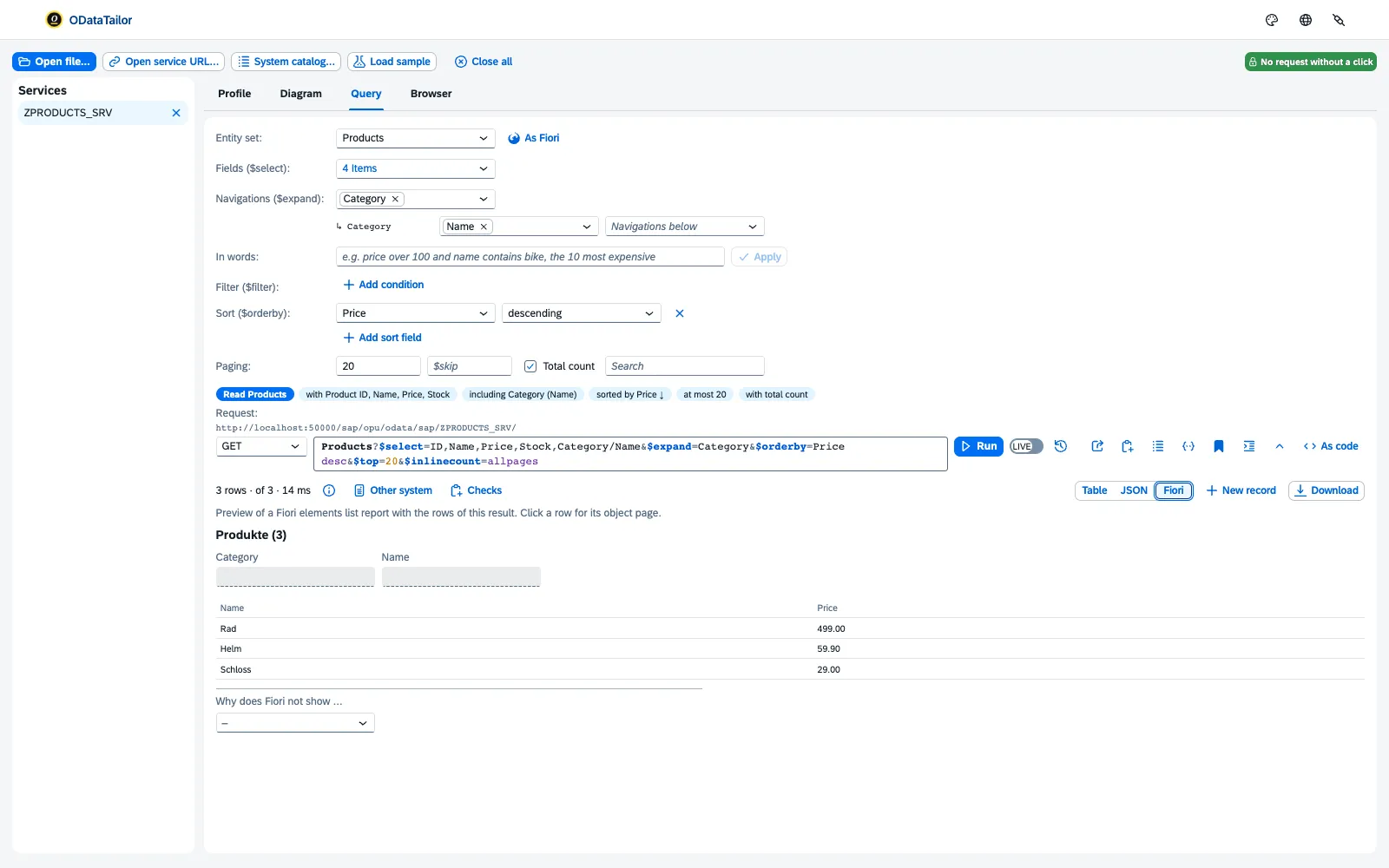
- “Query as Fiori would”.Columns from UI.LineItem, sorting from UI.PresentationVariant, filter fields from UI.SelectionFields8, 20 rows with count – as a start card for every set with a LineItem.
- Builder.
$select, an$expandtree up to three levels, conditions with value help from Common.ValueList9, sorting, paging. The URL stays freely editable, with highlighting and pretty print. - The query as a sentence.What the request asks, in one sentence; “Did you mean …?” before sending, Ctrl/⌘+Enter sends.
- “In words”.“price over 100 and name contains bike, the 10 most expensive”10 becomes
$filter,$orderbyand$top– by rules, without AI. - Results as in Fiori.Units and currencies, dates, text for the code; column profile, quick search, comparison with the previous run, a record view with navigations and actions.
- Fiori preview and “Why does Fiori not show …”.List report and object page from the result; per field, the annotation that hides it in the table, the filter bar or the object page.
- “As code”, CSV and mock data.UI5, CAP cds.ql, fetch, cURL11; mock data for UI5 MockServer and CAP, texts as pseudonyms.
Chapters and transcript
Chapters
- Introduction
- As Fiori
- Fiori preview
- Builder
- Value help
- In words
- As code
What is said in the video
Query without knowing the OData syntax by heart: ODataTailor builds the request from the metadata, shows the result the way Fiori does – and explains why a field is missing. One click on “Query as Fiori would” – and you have the request a list report starts with: columns from UI.LineItem, sorting from the PresentationVariant. That is why the most expensive product is on top.
The “Fiori” view shows the same rows as a list report, and a click opens the object page. “Why does Fiori not show …” tells you for each field which annotation hides it or puts it elsewhere. Builder and URL stay in sync: what you type into the URL shows up in the builder at once – and below it as a sentence.
Only “Run” sends anything. If a field has a value help from Common.ValueList, ODataTailor fetches the values on click – searchable, as in Fiori. Typos stand out before you send – with a suggestion from the metadata.
“In words” reads a sentence with the field names and labels of the service – locally, with no AI service. It becomes filter, sorting and row count. And “As code” gives you the finished request for your app: as a UI5 call, as fetch, as cURL – or simply as a URL.
ODataTailor is free, with no account and no server. More at odatatailor.com.
Docs: Querying →
Writing with a preview. And with a lock.
The workbench checks changing requests12 against the metadata before they go – and on production systems they do not go at all3.
- POST, PUT, PATCH, MERGE, DELETE.A template from the metadata; checks of types, Nullable, MaxLength, mandatory fields, keys and unknown fields with a “use …” fix.
- CSRF and ETag.The extension fetches the CSRF token itself and keeps it in memory only; If-Match comes from the record or via “Load ETag”.
- Draft flow.Create, change, prepare, activate and discard a draft13 – step by step for V4 draft roots; “Drafts and locks” shows who holds a draft.
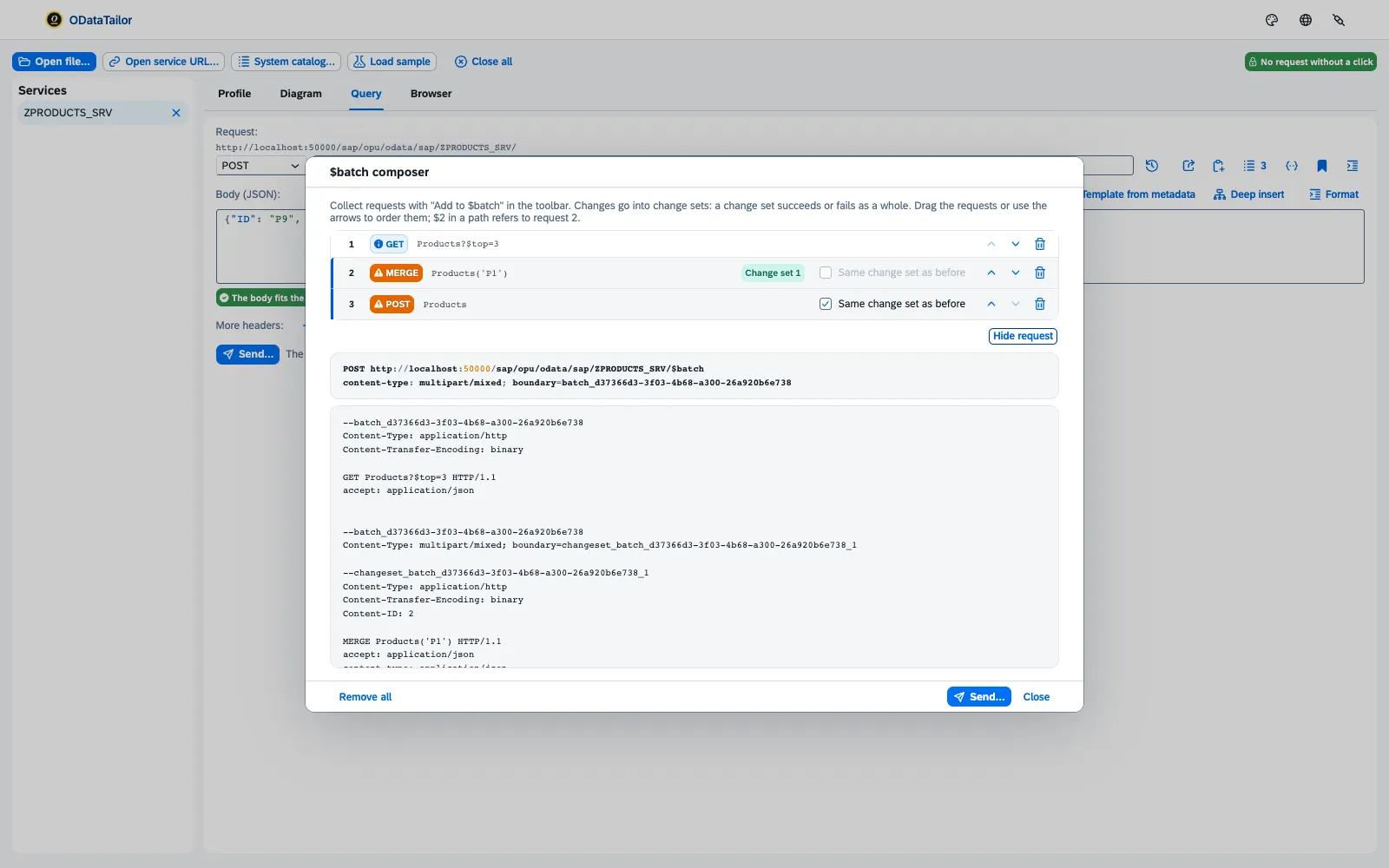
- $batch composer.Collect requests, form change sets, check $n references14; responses per part with the SAP error message.
- Actions, functions, deep insert.Matching operations for the path with parameters from the metadata; templates for nested creates.
- PROD lock.A switch per system, plus the IT’s
prodHostspolicy. The extension’s background blocks fail-closed.
Chapters and transcript
Chapters
- Introduction
- Edit
- Send
- Draft
- $batch
- PROD lock
What is said in the video
Reading is one thing. Changing data needs care: ODataTailor checks every request against the metadata, shows it before sending – and protects production systems. “Edit” takes over the record: path, values and ETag.
For OData V2, that becomes a MERGE. The check knows the metadata: “Nme” is not a field, and Stock is a whole number. One click takes the right field.
“Send…” shows the request with all headers. Only “Send now” sends it. ODataTailor fetches the CSRF token itself – and never stores it.
For V4 drafts, “Edit as draft” guides you through the steps from Common.DraftRoot: create the draft, change it, prepare, activate – each step with its request. The editor follows the current step: now it is a PATCH on the draft. Preparing is optional – then activate, and the active record carries the change.
Several requests at once? “Add to $batch” collects reads and changes; changes go into the change set. You see the whole $batch first – and afterwards the answer of every part.
And on systems marked as production, ODataTailor sends nothing that changes data. IT can also set that by policy. ODataTailor is free, with no account and no server.
More at odatatailor.com.
Docs: Changing, draft and $batch →
What worked yesterday – does it still work today?
Saved requests, comparisons across systems and the error with the way to its cause.
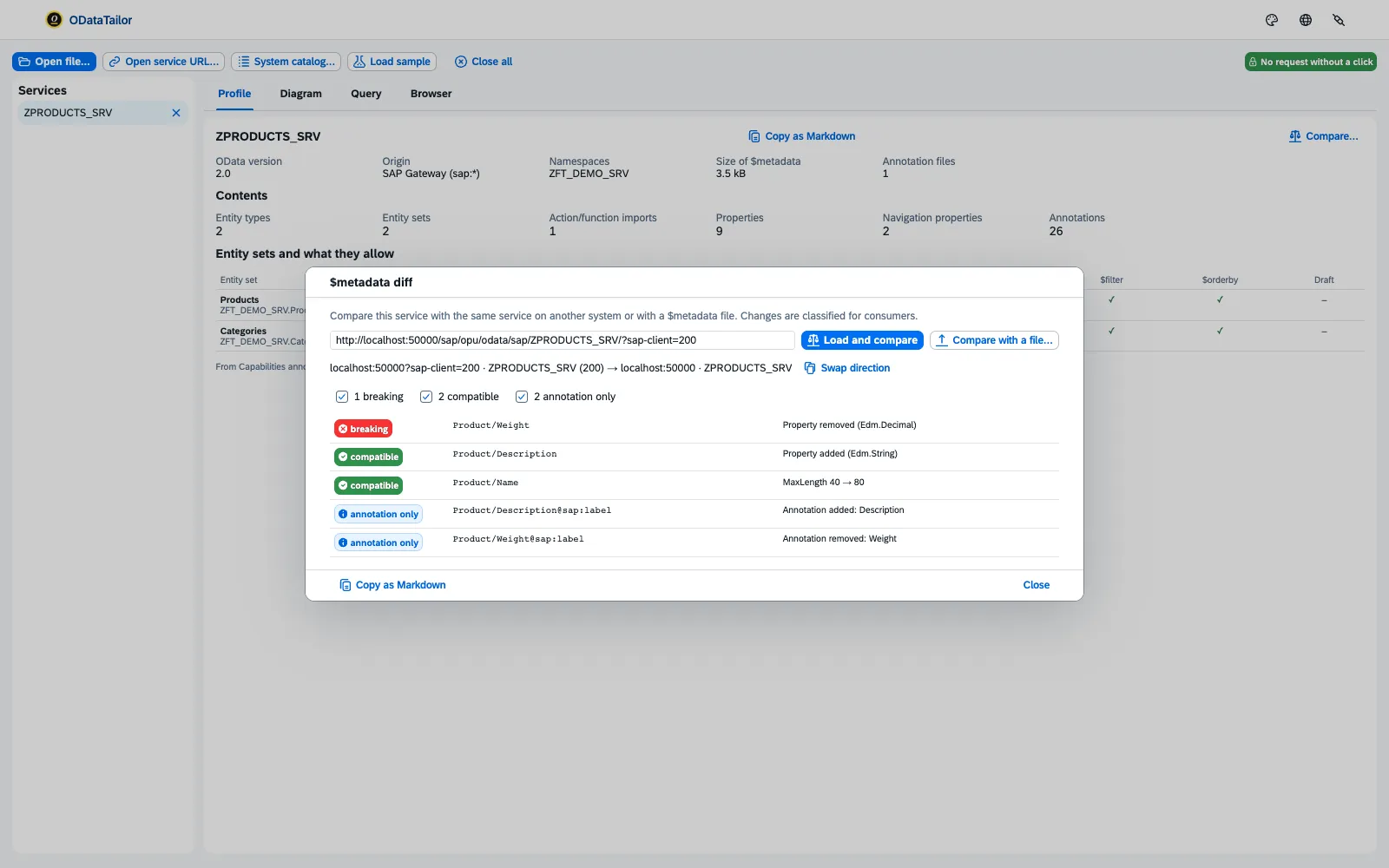
- Collections.Requests per service with variables and checks15 on status, rows, duration and field values; import from cURL and Postman, export as Postman,
.httpand Playwright. - “Other system” and “Run on systems…”.Row by row via the key16; the whole collection as a request × system matrix. GET only.
$metadatadiff.Breaking, compatible or annotation only17 – against another service, another system or a file; report as Markdown.- Errors with a way out.Cause and transaction18: SU53, PFCG, /IWFND/MAINT_SERVICE, SICF, SM59, SEGW, ST22, SMICM, error logs – one click into SAP GUI for HTML.
- Where the time goes.“Request SAP statistics”19 shows application, Gateway, hub, RFC and network as bars; plus the largest columns with “leave out ($select)”.
Watch the app while it asks.
The ODataTailor DevTools panel captures the OData calls of any web app20; the workbench analyses them.
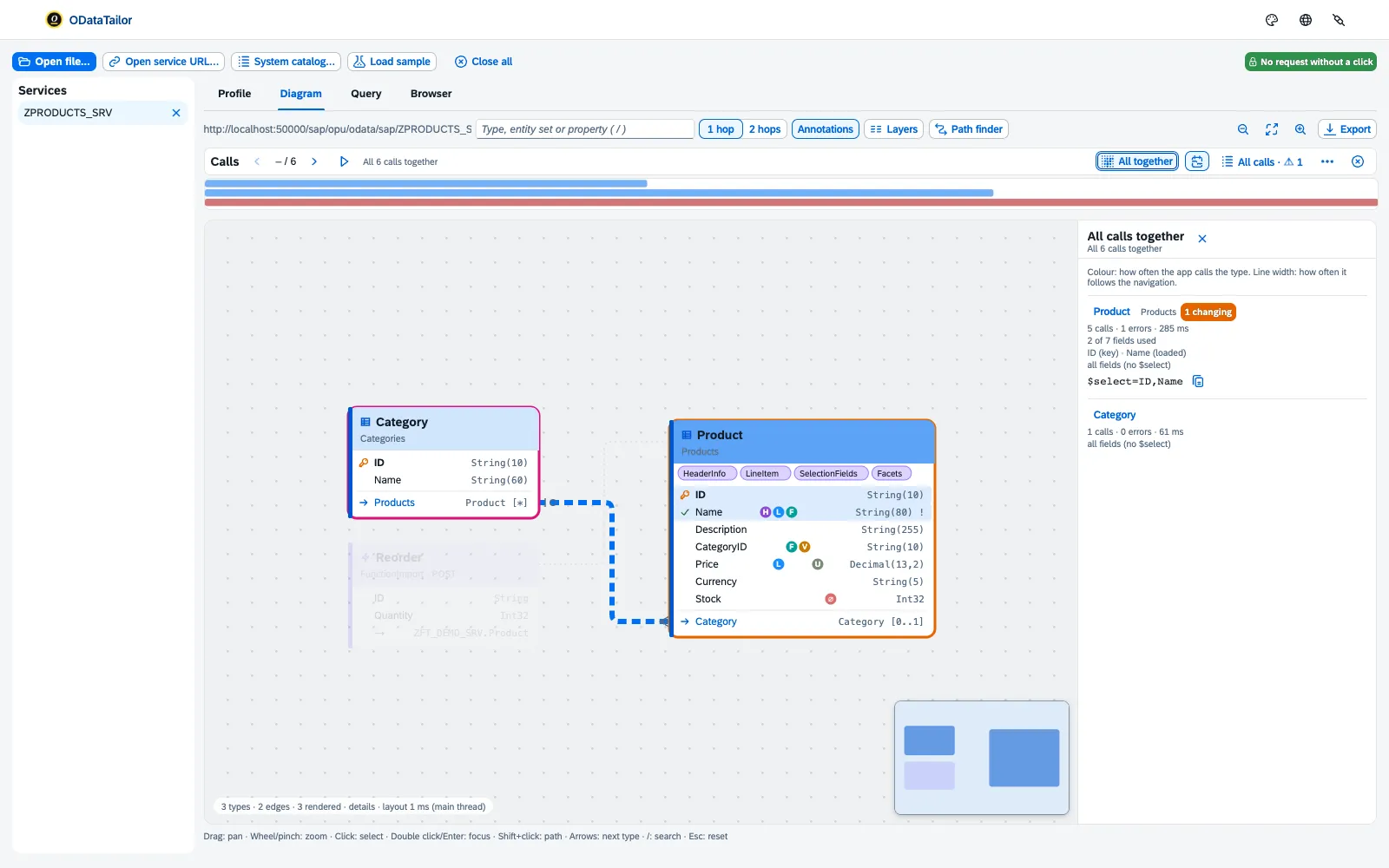
- Redacted, in memory.Headers, URL parameters and
$batchbodies are redacted while recording; at most 500 requests, only while the panel is open. - Into the workbench.“Open in workbench” hands over
$metadataand calls without a new network call; “Live to workbench” shows new calls as they come. - Step through and understand.Every call in the diagram, with its role21 – value help, table page, object page, side effect, draft step.
- “All together” and “Better this way”.A heat map with an
$selectsuggestion per type, fields that are loaded but never shown; “Measure both” compares time and data volume. - As a file.Save as
.odtrace, open it again and compare two captures; a UI5 MockServer recording from the responses.
Chapters and transcript
Chapters
- Introduction
- Record
- $batch
- Play
- Better this way
- FrontTailor
What is said in the video
What does your app really call – and how often? The ODataTailor panel in the DevTools captures every OData call, in any web app. The workbench then analyses it.
Open the DevTools, tab “ODataTailor”: the panel records while the app loads – $metadata, annotations, value help, $batch. Everything stays in this panel. A $batch shows its parts one by one.
And in the headers, tokens are replaced by “redacted” – the capture never keeps credentials. With “Pause” and “Record” you decide what gets in. “Open in workbench” hands the service and all its calls to the workbench.
Now the calls lie on the diagram. “Play” steps through them in order: which entity, which fields, which role in the app. “All together” sums up all calls per entity: how often, how fast, which fields are used – and which $select would do.
And where it can be done better, “Better this way” says so: here one $filter replaces three single reads. “Measure both” sends both variants with your session – GET only, only on your click. Which UI action triggered a request and which controls are bound to the data – FrontTailor shows that, right in the running Fiori app.
More at fronttailor.com. ODataTailor is free, with no account and no server. More at odatatailor.com.
Docs: Capture →
Which button triggered this call?
Only a tool that sits inside the app can see that. FrontTailor22 contains the same workbench, plus the triggering UI action, the bound controls and the jump to the control23.
Sources on this page
The superscript numbers in the text point here. Tap one to see the source right where it is used; all sources of this website are listed on one page.
- 1
Open a service: URL, catalogue, file ↑Product · ODataTailor product documentation, implementation plan, phases 0 and 1 · checked on 2026-11-21
- 2
Permissions: storage, host access per system ↑Product · ODataTailor product documentation, manifest (wxt.config.ts), ADR-004 and ADR-009 · checked on 2026-11-21
- 3
PROD lock, fail-closed ↑Product · ODataTailor product documentation, ADR-007 and manifest (managed_schema) · checked on 2026-11-21
- 4
Workspace only locally in the browser ↑Product · ODataTailor product documentation, ADR-005 · checked on 2026-11-21
- 5
Diagram with path finder and explained annotations ↑Product · ODataTailor product documentation, implementation plan, phase 1, diagram · checked on 2026-11-21
- 6
Service profile and metadata browser ↑Product · ODataTailor product documentation, implementation plan, phase 1, workbench · checked on 2026-11-21
- 7
Query builder from the metadata ↑Product · ODataTailor product documentation, implementation plan, phase 1, query builder · checked on 2026-11-21
- 8
Query like Fiori, Fiori preview, “Why does Fiori not show …” ↑Product · ODataTailor product documentation, implementation plan, phases 1 and 2 · checked on 2026-11-21
- 9
Value help from Common.ValueList ↑Product · ODataTailor product documentation, implementation plan, phase 1, query builder · checked on 2026-11-21
- 10
$filter from natural language, without AI ↑Product · ODataTailor product documentation, implementation plan, phase 2, naturalFilter · checked on 2026-11-21
- 11
“As code” and mock data ↑Product · ODataTailor product documentation, implementation plan, phases 1 and 2 · checked on 2026-11-21
- 12
Changing requests with checks ↑Product · ODataTailor product documentation, implementation plan phase 2 and ADR-007 · checked on 2026-11-21
- 13
Guided draft flow ↑Product · ODataTailor product documentation, implementation plan, phase 2, draft · checked on 2026-11-21
- 14
$batch composer ↑Product · ODataTailor product documentation, implementation plan, phase 2, $batch · checked on 2026-11-21
- 15
Saved requests, variables, checks, export ↑Product · ODataTailor product documentation, ADR-008 and implementation plan phase 2 · checked on 2026-11-21
- 16
System comparison and collection run ↑Product · ODataTailor product documentation, implementation plan, phase 2, system comparison · checked on 2026-11-21
- 17
$metadata diff with breaking changes ↑Product · ODataTailor product documentation, implementation plan, phase 2, diffMetadata · checked on 2026-11-21
- 18
Errors with a way out and SAP transactions ↑Product · ODataTailor product documentation, implementation plan, phase 2, errorAdvice · checked on 2026-11-21
- 19
SAP statistics as bars ↑Product · ODataTailor product documentation, implementation plan, phase 2, “Where the time goes” · checked on 2026-11-21
- 20
Capture in the DevTools panel, redacted ↑Product · ODataTailor product documentation, ADR-009 · checked on 2026-11-21
- 21
Calls in the diagram, overview, “Better this way” ↑Product · ODataTailor product documentation, ADR-009, implementation plan phase 2 · checked on 2026-11-21
- 22
FrontTailor – developer tools for SAP Fiori and UI5 ↑Vendor · fronttailor.com · checked on 2026-11-21
- 23
What only FrontTailor can do on the running app ↑Product · FrontTailor ADR-050 (21 November 2026) · checked on 2026-11-21
Questions about the features.
- Which OData versions does ODataTailor understand?
- OData V2 and V4, as $metadata in EDMX format or as CSDL JSON, plus annotation files. JSON batch is available from V4.01, multipart batch for V2 and V4.
- Where does ODataTailor get the annotations of a V2 service from?
- From the SAP Gateway system catalogue: it names a service’s annotation files, and the workbench loads them along. You can add your own annotation files by drag and drop.
- Can I save requests and share them with the team?
- Yes, as a collection per service, relative to the service root and without secrets. You can share it as a Postman collection, as an .http file or as Playwright tests.
- Does capture need FrontTailor?
- No. ODataTailor’s DevTools panel recognises OData in any web app, even without UI5. On a UI5 app, FrontTailor adds which UI action triggered a call and which control is bound to it.
Your question isn’t here? Talk to me: +43 664 1964199 office@clouddna.at Get in touch