OData, made readable.
Fiori does not show a field, the list stays empty, the Gateway says 400. The answer is almost always in the service – in its metadata, annotations and calls. ODataTailor is a browser extension1 that opens2 an OData service, explains it as a diagram3 and queries it like Fiori4 – with your browser’s own sign-in, without a server5.
The small numbers are sources: tap to see source and check date, all of them are listed at the bottom of the page.
- Free, no account6
- OData V2 and V4
- PROD lock for changes
- No cookies on this site
 The SAP & AI experts from Austria!
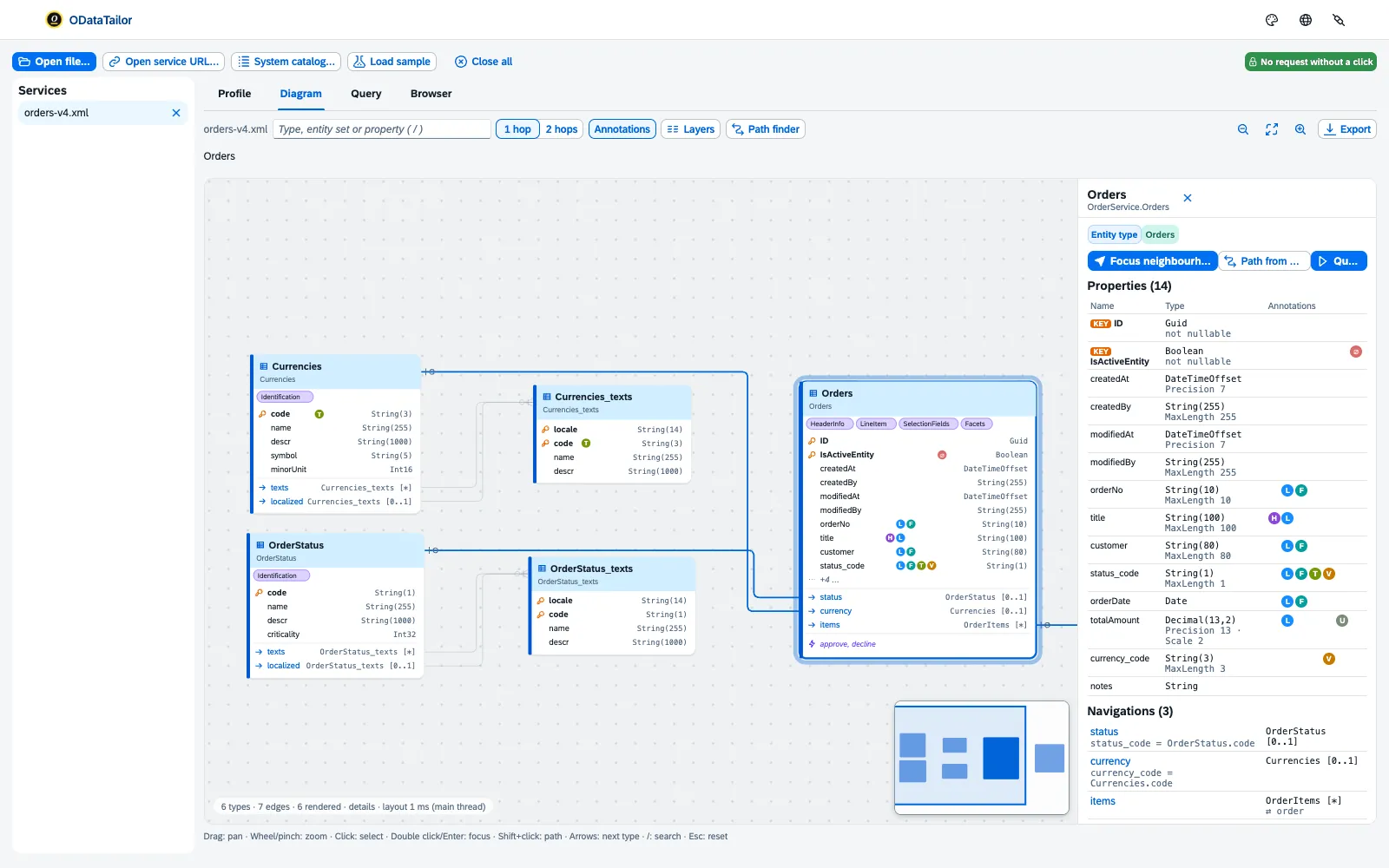
Orders. All images show made-up data7.Every question about a Fiori app sooner or later becomes a question about its service. And the service answers in XML.
Between the field on the screen and the table in the database there are many layers:
- Fiori app
- Annotations
- $metadata
- Request
- Gateway
- Backend
The tools for it are scattered: the $metadata as XML in a browser tab, the request in Postman, the annotations in a second file, the error in /IWFND/ERROR_LOG, the role in SU53. Each shows a fragment. None of them shows how the app actually asks the service.
You read the service in pieces. You would need to understand it as a whole.
ODataTailor puts the pieces on one workbench: the diagram from the metadata, the annotations with explanations, the query the way Fiori would ask it, and the error with the way to its cause.
$metadata as XMLTypes, navigations and annotations as a diagramThe whole story: why we turned FrontTailor’s OData workbench into a tool of its own →
Once through the workbench.
Open a service, read it as a diagram, query it as Fiori would, change data safely, capture calls – with chapters and the spoken text to read along. There is a video for each area under Features.
Chapters and transcript
Chapters
- Introduction
- Open
- Understand
- Query
- Change
- Capture
What is said in the video
An OData service is more than a URL: types, navigations, annotations. ODataTailor is the workbench for it – free, right in your browser, with no account and no server. You open a service with “Open service URL…” or from the “System catalog…”.
ODataTailor uses your sign-in in the browser and asks once per system for access. The profile shows where the service comes from and what each entity set allows: create, update, filter, sort. The diagram shows every type with its navigations.
The markers stand for annotations – one click explains what Fiori makes of them. With “Query as Fiori would”, you query like a list report: columns from UI.LineItem, sorting and count. You see the result as a table – or the way Fiori shows it.
Or you write it “In words” – it becomes $filter, $orderby and $top. And “As code” takes it with you: for UI5, fetch or cURL. Changing data works too – checked against the metadata, with CSRF token and ETag.
Before anything is sent, you see the request and confirm with “Send now”. And once a system is marked as production, ODataTailor sends nothing there that changes data – not even by accident. And what does your app really call?
The DevTools panel captures every OData call, including the parts of a $batch. “Open in workbench” puts the calls into the diagram – and “Better this way” shows where one call does the job of three. Free, with no account and no server – credentials are never stored.
More at odatatailor.com.
One service, one workbench.
ODataTailor opens as a tab of its own. On the left are the opened services, on the right the tabs Profile, Diagram, Browser and Query. What you do there stays locally in your browser8.
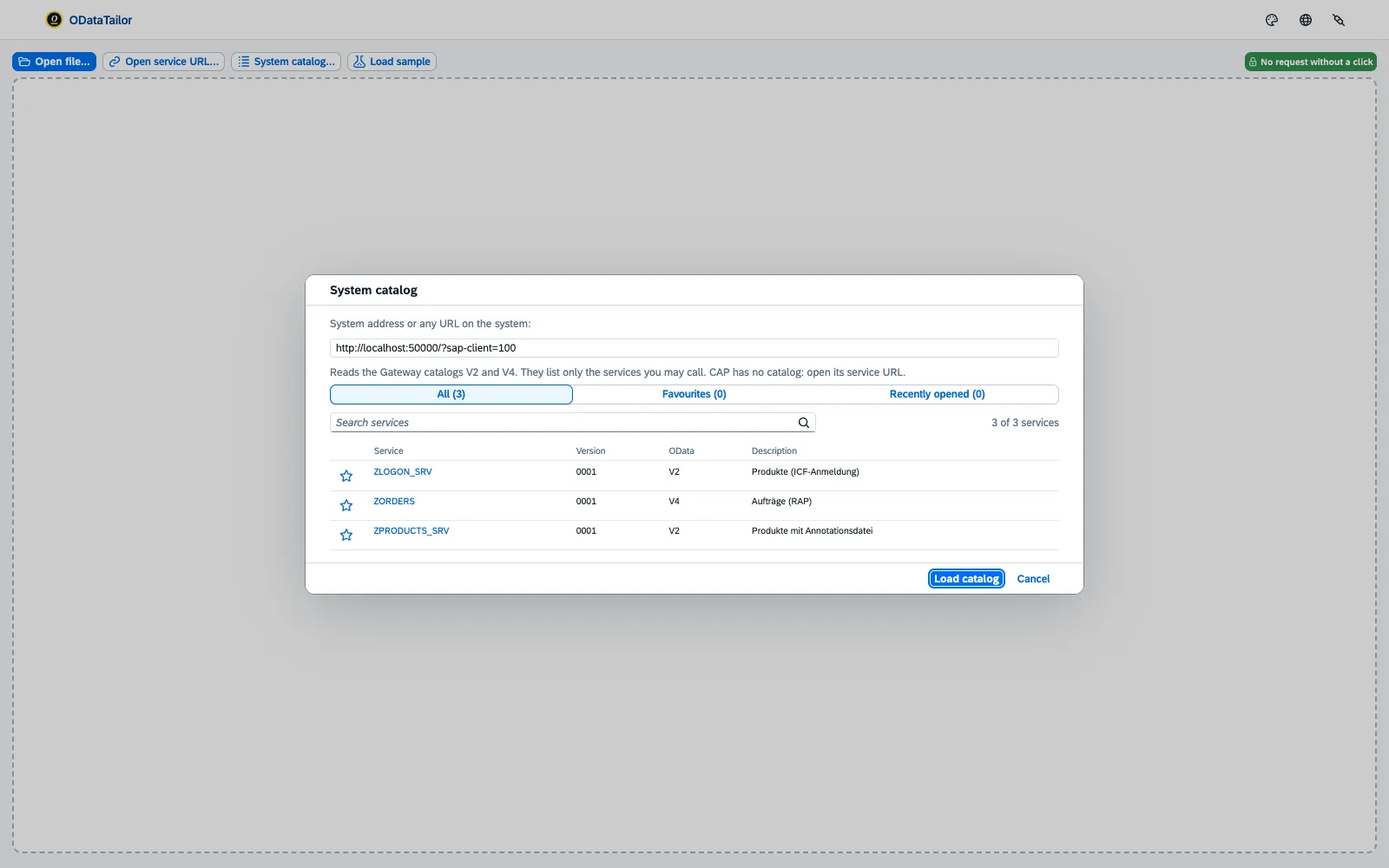
Service URL, catalogue or file.
The service URL with your browser’s sign-in, the SAP Gateway system catalogue2 for V2 and V4 with search and favourites, or an EDMX or CSDL JSON file by drag and drop. The browser asks for access to a system once per system, on click9.
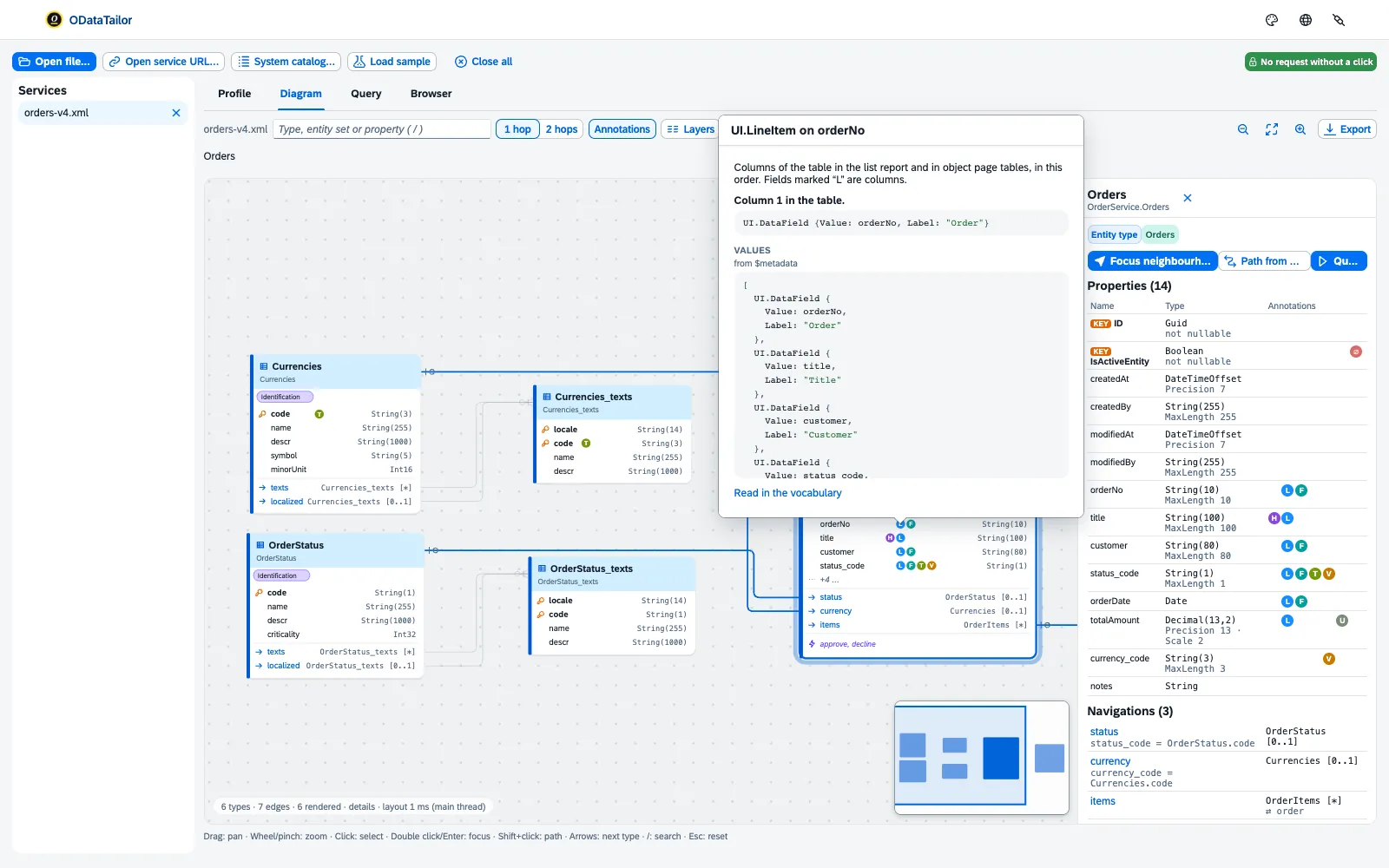
Annotations that explain themselves.
The diagram3 shows every type with its navigations. Each annotation sits as a marker on its field; a click explains what UI.LineItem, UI.HeaderInfo or Common.ValueList does in Fiori. The path finder builds the $expand between two types, the profile10 sums up the service as Markdown.
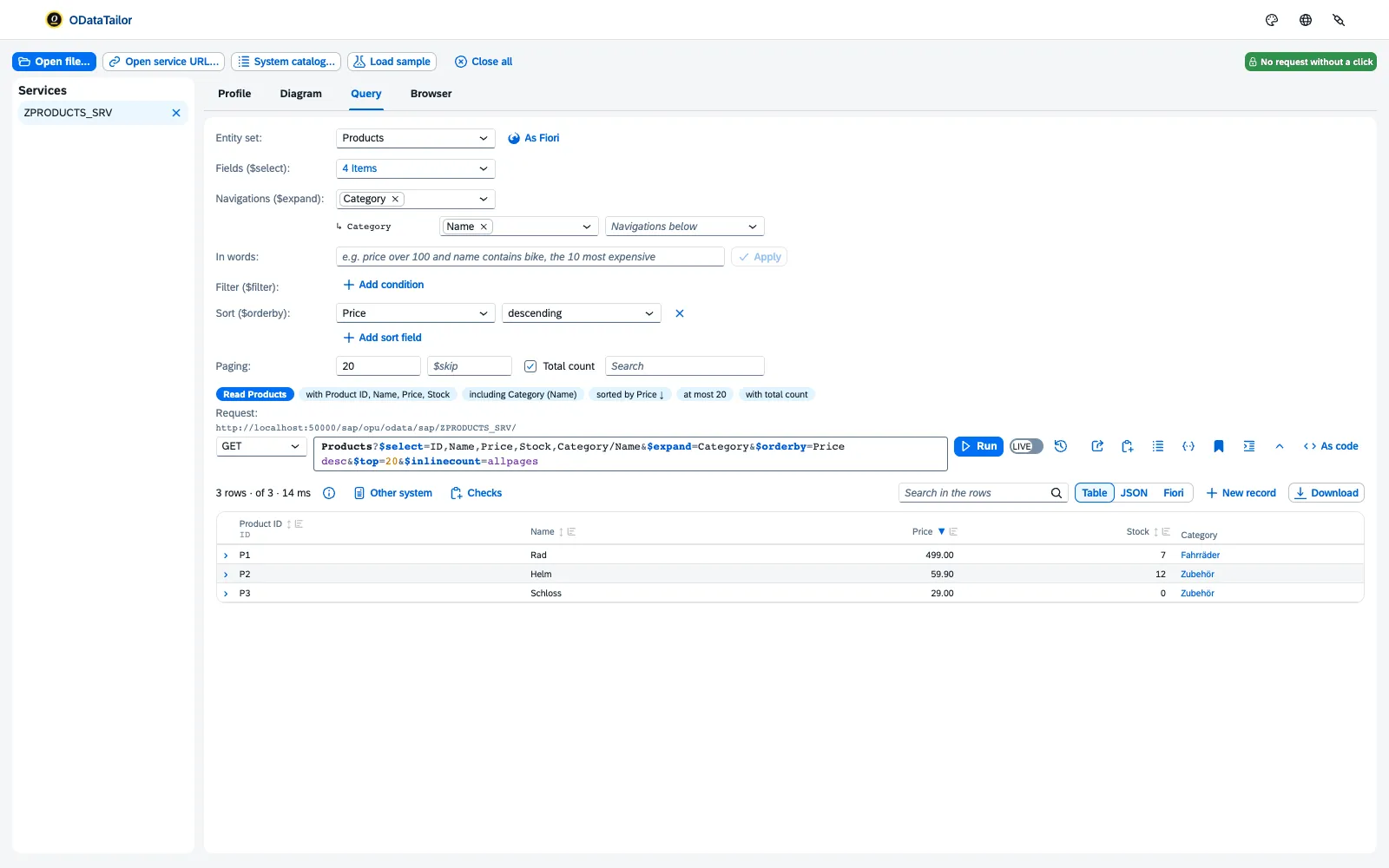
Ask the way Fiori asks.
“Query as Fiori would” builds the request of a list report from UI.LineItem, UI.SelectionFields and UI.PresentationVariant. The query builder11 knows the fields, offers the value help12 and spells the query out as a sentence. “In words”13 turns “price over 100, the 10 most expensive” into a $filter – without AI.
The result is formatted as in Fiori, optionally as a list report and object page4, and “As code”14 for UI5, CAP, fetch or cURL.
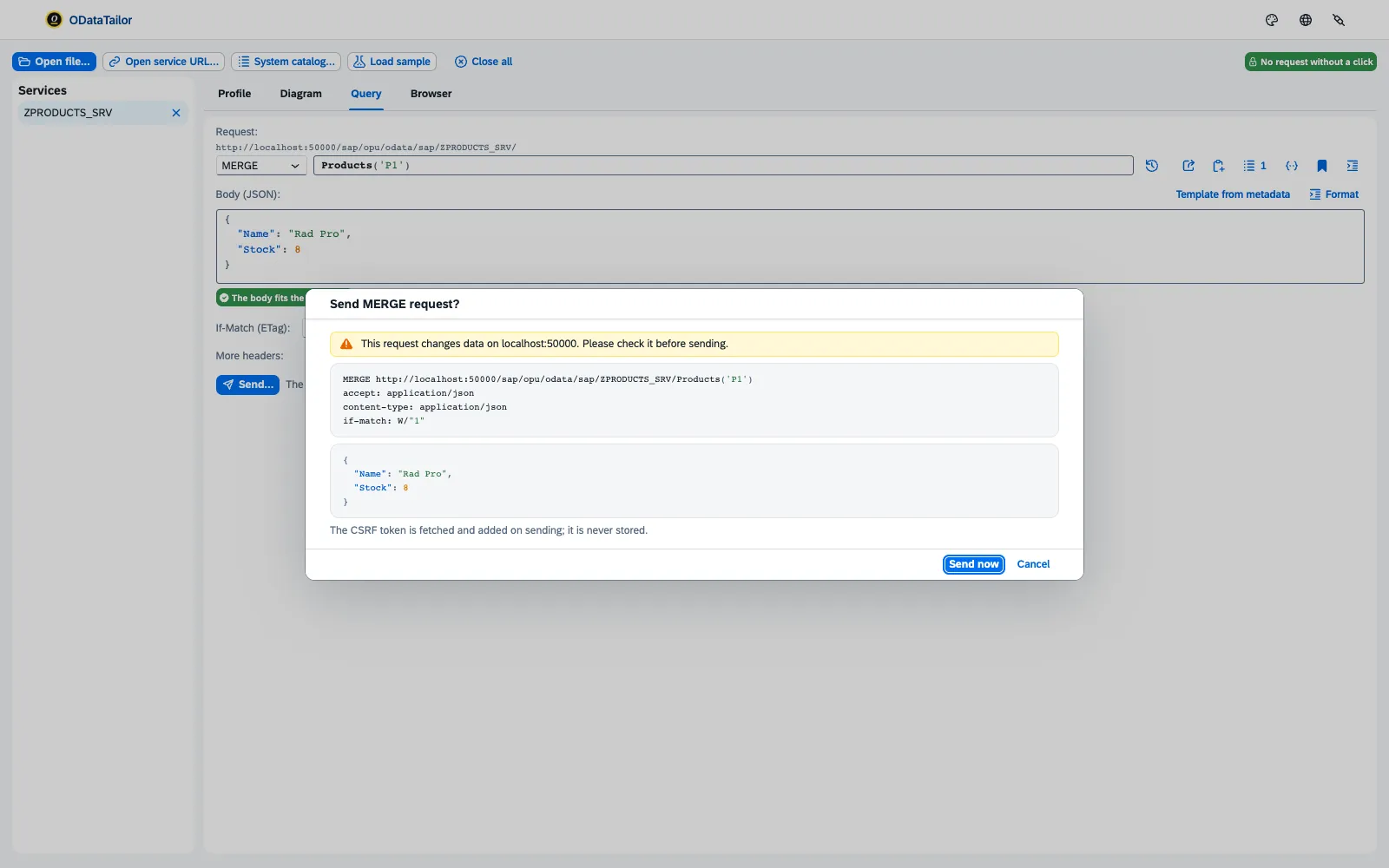
Changing data with a safety net.
POST, PATCH, MERGE and DELETE15 with a template from the metadata that checks the body before sending. The extension fetches the CSRF token and ETag itself. Plus the guided draft flow16 and the $batch composer17.
On systems marked as production, the extension sends nothing that changes data18 – also when IT enforces it by policy.
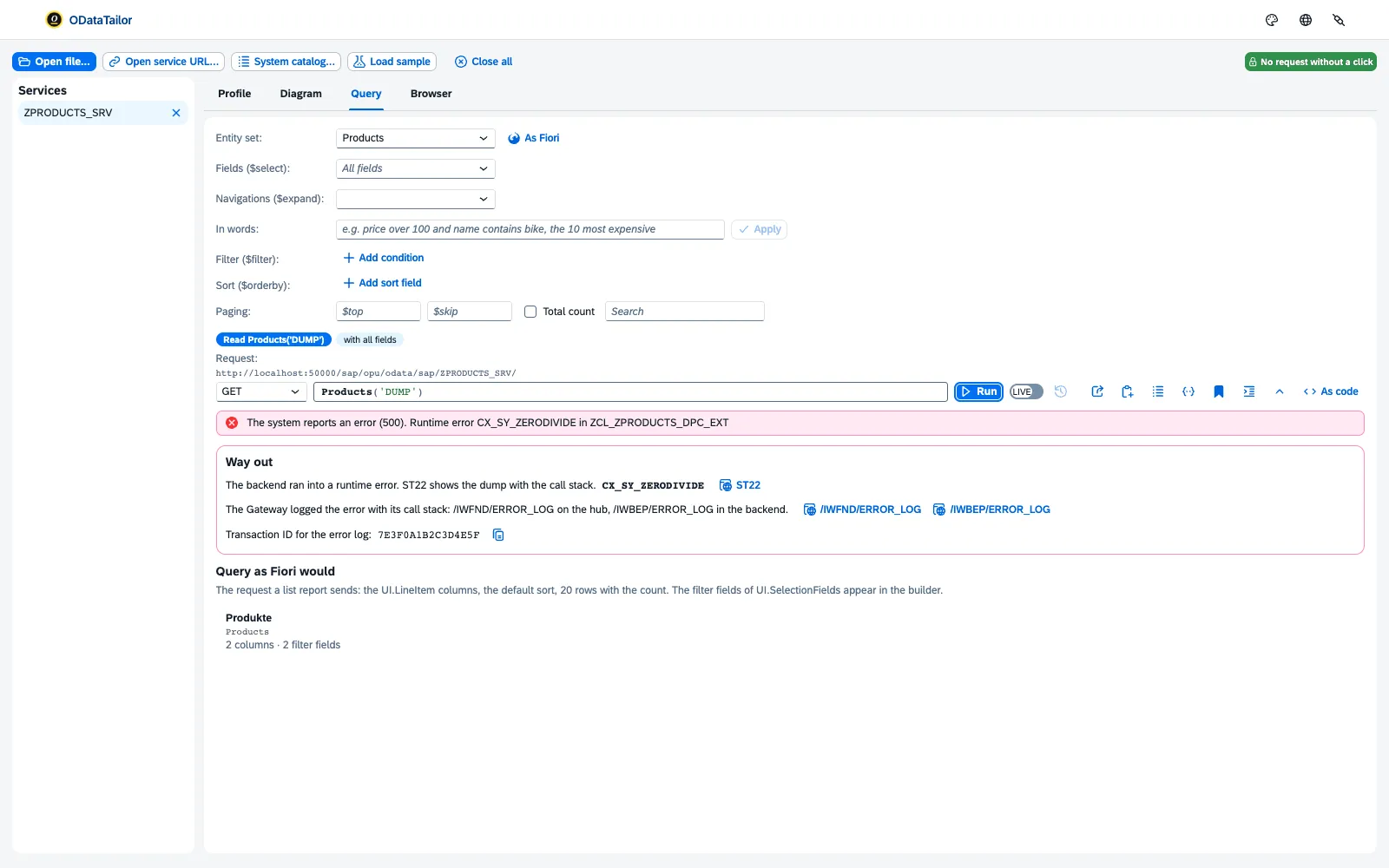
The error with the way to its cause.
An error comes with its likely cause and the matching transaction19: SU53, /IWFND/ERROR_LOG, ST22 or SEGW open with one click on the same system. SAP statistics20 show where the time goes.
Saved requests with checks21 run on several systems, “Other system”22 compares row by row, and the $metadata diff23 finds breaking changes before the transport.
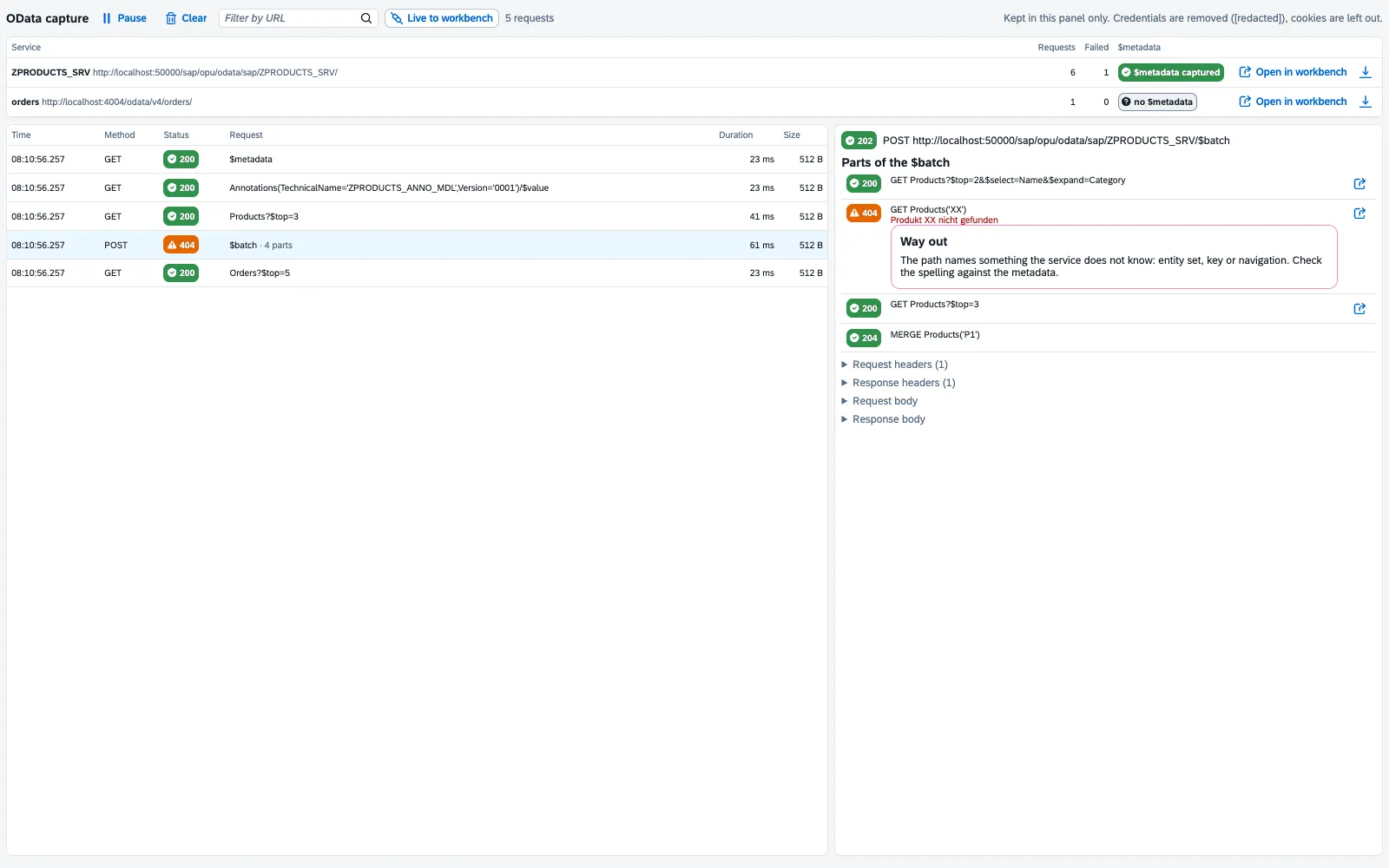
How does the app really ask the service?
The ODataTailor DevTools panel captures the OData calls of any web app24 – redacted, in memory only. In the workbench you step through them in the diagram, see the role of every call and the overview as a heat map25. “Better this way” suggests $select and $expand and measures both variants.
GET ONLY.
The workbench page itself sends only reading requests. Everything that changes data goes through the extension’s background, which checks first and blocks when in doubt18. The yellow markers on this page? Behind each one is a source with a check date.
All sourcesYour sign-in. Your browser. No server in between.
A tool that accesses SAP systems with your session has to explain itself. That is why ODataTailor is built so that there is little to explain.
Security in detail →- The workbench runs in your browser. No telemetry, no analytics, nothing from third parties5 – fonts and themes ship with the extension too.
- No call without your request. A service is only called when you open or query it26.
- Host access one by one. The browser asks for each system separately9, and the “Systems” dialog revokes it.
- Nothing secret is stored. Credentials, tokens and cookies27 go neither into storage nor into exports.
Two minutes to your first query.
Free, no account. The extension is available for Chrome, Edge and Firefox1. Version 0.1.028 is built; the stores follow.
We give ODataTailor away for free, because we open, query and check OData services in our own SAP projects every day – and had no tool in the browser that really understands the metadata.
- Chrome Web StoreReview in progressRequest an early copy →
- Microsoft Edge Add-onsReview in progressRequest an early copy →
- Firefox Add-onsReview in progressRequest an early copy →
Review in progress Version 0.1.0 is built; submission to the stores follows. Until then you can get the extension on request as a package to load – with all features.
- Installand open the workbench from the extension’s icon.
- Open a serviceservice URL, system catalogue or
$metadatafile; the browser asks once per system. - Understandread the profile and the diagram, click a marker.
- Querypick a “Query as Fiori would” start card – the result looks as it does in Fiori.
When ODataTailor does not help you.
A checking tool that only knows its advantages has not checked itself. Here is our list.
- You want to build or change the service.ODataTailor reads and queries services; it replaces neither SEGW nor ADT nor the CAP tools. You still get the
$metadatadiff before the transport. - The question is about the running app.Which button triggered a call, or which control is bound to a field, only a tool inside the app can see. That is FrontTailor.
- You are looking for a load test.“Measure both” and SAP statistics measure single requests. Load and endurance need tools of their own.
- Your browser is not allowed extensions.Then IT comes first. For them, the security page lists which permissions ODataTailor needs and when.
The same workbench, two tools.
ODataTailor grew out of FrontTailor29, the developer tools for SAP Fiori and UI530. Both use the same packages – what the workbench learns here, it can do there too.
ODataTailor
The workbench on its own, for any OData service – even without a running app, even without UI5.
- Open a service, diagram, annotations, query
- Change with checks, draft,
$batch, PROD lock - Collections, system comparison,
$metadatadiff - Capture in the DevTools panel for any web app
- Free, no account
FrontTailor
The same workbench in the OData module, plus what only works on the running Fiori app31:
- which UI action triggered a call (recorder)
- the bound controls of a type
- “Jump to control” in the app
- annotation explorer, inspector, performance and quality check
- reading in the Community edition, changing with Pro
From practice with Fiori elements and OData.
ODataTailor comes from CloudDNA32. Its founder Martin Koch wrote the books on SAP Fiori elements, SAPUI5 and full-stack development33 with Rene Glavanovits, Daniel Krancz and Maximilian Olzinger – much of what the workbench reads from the annotations is explained there in detail.
-
 SAP Fiori elements
SAP Fiori ElementsDevelopment and Extensibility
Rene Glavanovits, Martin Koch, Daniel Krancz, Maximilian Olzinger
How annotations build the list report and object page, and how to develop and extend Fiori elements apps. The diagram markers, “Query as Fiori would” and “Why does Fiori not show …” read exactly these annotations.
View at the publisher ↗
-
 SAPUI5
The Comprehensive Guide
Rene Glavanovits, Martin Koch, Daniel Krancz, Maximilian Olzinger
The comprehensive guide to SAPUI5: controls, data binding, models and OData. Background to “As code”, which writes a query as a UI5 binding with Filter and Sorter.
View at the publisher ↗
-
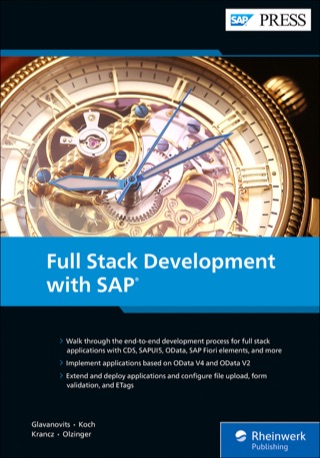 Full stack
Full Stack Development with SAP
Rene Glavanovits, Martin Koch, Daniel Krancz, Maximilian Olzinger
One application across every layer: from the backend through OData to the Fiori UI. Helps when the fault is not in the app but in the service behind it.
View at the publisher ↗
Covers: Rheinwerk Verlag (SAP PRESS). The links go to the publisher.
Fifteen siblings – each for its own craft.
Every Tailor solves a problem we know up close. Most siblings share the Tailor-Plattform with EU data residency and an AI layer. ODataTailor is one of the browser tools: no server, no data stored with us, just a workbench in your browser. It grew out of FrontTailor’s OData console and metadata explorer – and it still lives there too.
- ODataTailorWorkbench for OData services – you are here.
- FrontTailorDeveloper tools for SAP Fiori® and UI5
- iFlowTailorWorkbench for SAP Cloud Integration
- AuthTailorSAML & OIDC tracer in your browser
- ProbeTailorAcceptance tests for SAP & business software
- JournalTailorIncoming invoices before SAP, BMD & DATEV
- DocumentTailorDocuments & signatures for SAP shops
- RecordTailorDocument management
- ImmoTailorProperty management & development
- TaxTailorTax advisors
- DineTailorRestaurants
- StayTailorHotels
- MeetingTailorMeetings & events
- WeintailorWinemakers
- BuildTailorConstruction & trades
Sources on this page
The superscript numbers in the text point here. Tap one to see the source right where it is used; all sources of this website are listed on one page.
- 1
Browser extension for Chrome, Edge and Firefox ↑Product · ODataTailor product documentation, README and build configuration · checked on 2026-11-21
- 2
Open a service: URL, catalogue, file ↑Product · ODataTailor product documentation, implementation plan, phases 0 and 1 · checked on 2026-11-21
- 3
Diagram with path finder and explained annotations ↑Product · ODataTailor product documentation, implementation plan, phase 1, diagram · checked on 2026-11-21
- 4
Query like Fiori, Fiori preview, “Why does Fiori not show …” ↑Product · ODataTailor product documentation, implementation plan, phases 1 and 2 · checked on 2026-11-21
- 5
No server, no telemetry, nothing from third parties ↑Product · ODataTailor product documentation, ADR-003 and end-to-end test “no request to third parties” · checked on 2026-11-21
- 6
Free, no account and no licence ↑Product · Product owner decision of 21 November 2026 · checked on 2026-11-21
- 7
Screenshots with made-up data ↑Product · ODataTailor product documentation, screenshot script e2e/shots · checked on 2026-11-21
- 8
Workspace only locally in the browser ↑Product · ODataTailor product documentation, ADR-005 · checked on 2026-11-21
- 9
Permissions: storage, host access per system ↑Product · ODataTailor product documentation, manifest (wxt.config.ts), ADR-004 and ADR-009 · checked on 2026-11-21
- 10
Service profile and metadata browser ↑Product · ODataTailor product documentation, implementation plan, phase 1, workbench · checked on 2026-11-21
- 11
Query builder from the metadata ↑Product · ODataTailor product documentation, implementation plan, phase 1, query builder · checked on 2026-11-21
- 12
Value help from Common.ValueList ↑Product · ODataTailor product documentation, implementation plan, phase 1, query builder · checked on 2026-11-21
- 13
$filter from natural language, without AI ↑Product · ODataTailor product documentation, implementation plan, phase 2, naturalFilter · checked on 2026-11-21
- 14
“As code” and mock data ↑Product · ODataTailor product documentation, implementation plan, phases 1 and 2 · checked on 2026-11-21
- 15
Changing requests with checks ↑Product · ODataTailor product documentation, implementation plan phase 2 and ADR-007 · checked on 2026-11-21
- 16
Guided draft flow ↑Product · ODataTailor product documentation, implementation plan, phase 2, draft · checked on 2026-11-21
- 17
$batch composer ↑Product · ODataTailor product documentation, implementation plan, phase 2, $batch · checked on 2026-11-21
- 18
PROD lock, fail-closed ↑Product · ODataTailor product documentation, ADR-007 and manifest (managed_schema) · checked on 2026-11-21
- 19
Errors with a way out and SAP transactions ↑Product · ODataTailor product documentation, implementation plan, phase 2, errorAdvice · checked on 2026-11-21
- 20
SAP statistics as bars ↑Product · ODataTailor product documentation, implementation plan, phase 2, “Where the time goes” · checked on 2026-11-21
- 21
Saved requests, variables, checks, export ↑Product · ODataTailor product documentation, ADR-008 and implementation plan phase 2 · checked on 2026-11-21
- 22
System comparison and collection run ↑Product · ODataTailor product documentation, implementation plan, phase 2, system comparison · checked on 2026-11-21
- 23
$metadata diff with breaking changes ↑Product · ODataTailor product documentation, implementation plan, phase 2, diffMetadata · checked on 2026-11-21
- 24
Capture in the DevTools panel, redacted ↑Product · ODataTailor product documentation, ADR-009 · checked on 2026-11-21
- 25
Calls in the diagram, overview, “Better this way” ↑Product · ODataTailor product documentation, ADR-009, implementation plan phase 2 · checked on 2026-11-21
- 26
No network call without a visible request ↑Product · ODataTailor product documentation, ADR-003 · checked on 2026-11-21
- 27
No credentials, tokens or cookies stored ↑Product · ODataTailor product documentation, CLAUDE.md, ADR-005, ADR-007 and ADR-008 · checked on 2026-11-21
- 28
Pre-release 0.1.0 of 21 November 2026 ↑Product · ODataTailor product documentation, manifest and implementation plan · checked on 2026-11-21
- 29
Grown out of FrontTailor, same packages ↑Product · ODataTailor product documentation, ADR-001 and ADR-010 · checked on 2026-11-21
- 30
FrontTailor – developer tools for SAP Fiori and UI5 ↑Vendor · fronttailor.com · checked on 2026-11-21
- 31
What only FrontTailor can do on the running app ↑Product · FrontTailor ADR-050 (21 November 2026) · checked on 2026-11-21
- 32
CloudDNA GmbH – SAP Silver Partner ↑Vendor · clouddna.at, start page and team · checked on 2026-11-05
- 33
Books on SAP Fiori elements, SAPUI5 and full-stack development ↑Vendor · Rheinwerk Verlag (SAP PRESS), search “martin koch” · checked on 2026-11-05
Short answers.
- What is ODataTailor?
- ODataTailor is a free browser extension for OData services (V2 and V4), for example from SAP Gateway, RAP or CAP. It opens a service by its URL, from the Gateway catalogue or as a file, shows it as a diagram with explained annotations, queries it the way a Fiori app does and changes data with checks and a PROD lock. The vendor is CloudDNA GmbH from Austria.
- What does ODataTailor cost?
- Nothing. We give ODataTailor away for free because we open, query and check OData services in our own SAP projects every day. There is no account, no licence and no paid features. If you want help with a service or a workshop, you can hire CloudDNA for that – it is a separate offer.
- How does ODataTailor sign in to the SAP system?
- It does not sign in by itself. The workbench uses your browser’s sign-in, just like a tab in which you open the service URL. If the session has expired, it offers “Sign in in a tab”. The extension never asks for a password and stores neither tokens nor cookies.
- Can I change data on PROD by accident with ODataTailor?
- Not if the system is marked as production. Changing requests and every $batch run through the extension’s background, which blocks systems with the “Production” switch or from the IT’s prodHosts policy. If it cannot tell, it does not send. On every other system nothing happens without preview and click.
- Do I need SAP to use ODataTailor?
- No. ODataTailor reads any OData V2 or V4 service and any $metadata or CSDL JSON file. The system catalogue, errors with SAP transactions, SAP statistics and the Fiori annotations are extras for SAP systems.
- What is the difference to FrontTailor?
- FrontTailor is the developer tool set for the running SAP Fiori and UI5 app. The same OData workbench lives there in the OData module, plus what only works on the running app: which UI action triggered a call, which controls are bound to a type, and the jump to the control. ODataTailor is the workbench on its own: for any service, even without a running app.
- Which browsers does ODataTailor support?
- Chrome and Microsoft Edge from version 137 and Firefox from version 140. Version 0.1.0 is built; until the stores approve it, it is available on request as a package to load.
- How do I query an OData service without setting up Postman?
- With ODataTailor you open the service URL and, in the Query tab, pick a “Query as Fiori would” start card or build the query from the metadata: fields, $expand, conditions with value help, sorting. The query appears as a sentence and as a URL; the result is formatted as in Fiori.
- Why doesn’t Fiori show a field although the service delivers it?
- Usually because of an annotation: UI.Hidden, a FieldControl, a missing entry in UI.LineItem or a TextArrangement that shows only the text. ODataTailor explains this under “Why does Fiori not show …” for every field – separately for the table, the filter bar and the object page.
- Is ODataTailor an SAP product?
- No. ODataTailor is a product of CloudDNA GmbH. It works with OData services from any vendor and changes nothing on them except the requests you send yourself.
Your question isn’t here? Talk to me: +43 664 1964199 office@clouddna.at Get in touch